Highly parallel workload: image gamma correction#
A GPU typically has thousands of computing cores that run in parallel. These
cores are best utilized when each calculates one partition of the output
results so that they do not need to communicate with other cores. Such
algorithms are often classified as “embarrassingly parallel,” as the
required programming effort is minimal. In the earlier vector_add
example (see SAXPY Tutorial - Hello HIP), you
identified an embarrassingly parallel workload example. In this section, you
will explore another one: image gamma correction.
Computational challenges in pixel-wise operations#
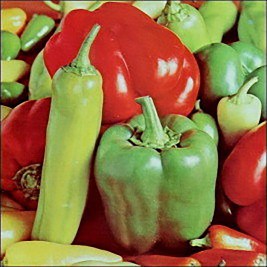 Original
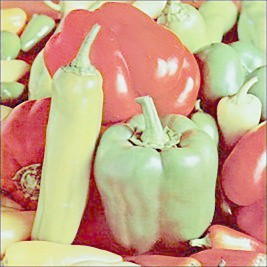 Gamma = 0.4
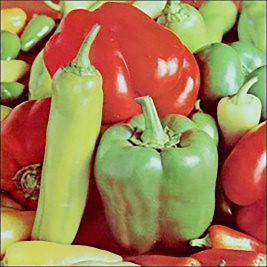 Gamma = 0.8
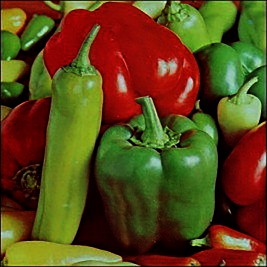 Gamma = 2.0
 Gamma = 4.0
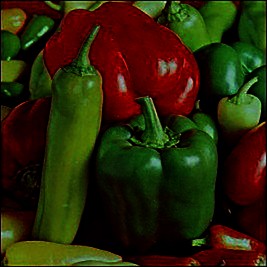
Image gamma correction algorithm. A gamma value smaller than one renders the image more brightly, whereas a value greater than one renders a darker image.#
Image gamma correction is a common image processing algorithm that adjusts the brightness of an image without changing the content. As shown in the figure above, when you apply a gamma value of less than one, the image becomes brighter, whereas a value greater than one darkens it.
Pictures stored on a computer are typically encoded using pixels (see figure below), which are square regions of an image that are each rendered with a single color. For example, the images used in the figures above and below have 267 (width) × 267 (height) pixels total. If the image is in color, three values representing red, green, and blue (RGB) would be required for each pixel to represent the brightness. Brightness is coded using an 8-bit integer [0–255], where zero represents the darkest shade, and 255 represents the brightest. The other key method uses a floating-point number between zero and one. The red brightness values of all pixels comprise the “red channel”. A colored image typically has three channels (RGB).
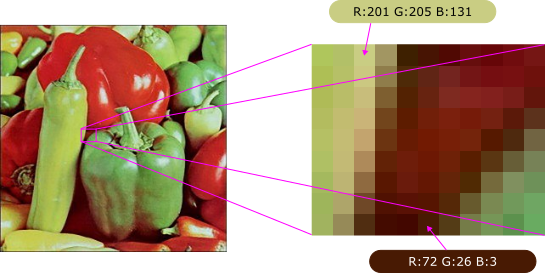
Computerized image organized using pixels. A color image usually requires RGB brightness values to represent the final pixel color.#
Image gamma correction is an element-wise operation that applies simple floating-point manipulation to all pixels and their channels. As shown in the equation above, the gamma value is applied as a power to the brightness value. A greater-than-one gamma decreases the brightness value. As suggested by the equation, the number of output values matches the number of input values, and the calculation of each output value is independent of the calculation of neighboring values. The image gamma correction algorithm is embarrassingly parallel and is therefore suitable for GPUs.
GPU kernel design and optimization strategies#
The following listing presents a simple implementation of the gamma correction algorithm using HIP.
 1#include <hip/hip_runtime.h>
 2
 3#include <cstdint>
 4#include <cstdlib>
 5
 6__global__ void image_gamma(std::uint8_t* d_image, float gamma, int num_values)
 7{
 8    int idx = threadIdx.x + blockIdx.x * blockDim.x;
 9    if (idx < num_values)
10    {
11        d_image[idx] = powf(d_image[idx] / 255.f, gamma) * 255.f;
12    }
13}
14
15int main()
16{
17    int width, height, channels, num_values;
18    std::uint8_t* data;
19
20    // Load an image from file.
21
22    int blockSize = 256;
23    int gridSize = (num_values + blockSize - 1) / blockSize;
24
25    float gamma = 4.f;
26    image_gamma<<<gridSize, blockSize>>>(d_image, gamma, num_values);
27
28    hipMemcpy(
29        data, d_image, num_values * sizeof(std::uint8_t), hipMemcpyDeviceToHost
30    );
31
32    // Save the image to an output file.
33
34    hipFree(d_image);
35    return EXIT_SUCCESS;
36}
To address this GPU programming problem, first consider how to map the threads
to the input and output elements. For embarrassingly parallel algorithms, the
mapping is straightforward because each thread is responsible for a part of the
output channel (a pixel). Therefore, the total number of threads will equal the
height × width × number of channels = num_values. To calculate the grid
size, divide num_values by the block size. If the block size is not a
multiple of num_values, you can round up to the next integer, as shown in
line 23 of the code sample above.
The block size can be between 1 and 1,024, depending on the device limitation. Note that selecting a suitable block size will improve the overall performance. According to the figure below, the performance is best when the block size is a multiple of 32, because RDNA GPUs organize groups of 32 threads in a wavefront, which is the smallest resource allocation unit.
Note
On CDNA GPUs, the wavefront size is 64.
Otherwise, the CUs will be forced to allocate more resources for each block, resulting in performance degradation. The selection of the block size as a multiple of the wavefront size is likely to optimize embarrassingly parallel applications with AMD GPUs.
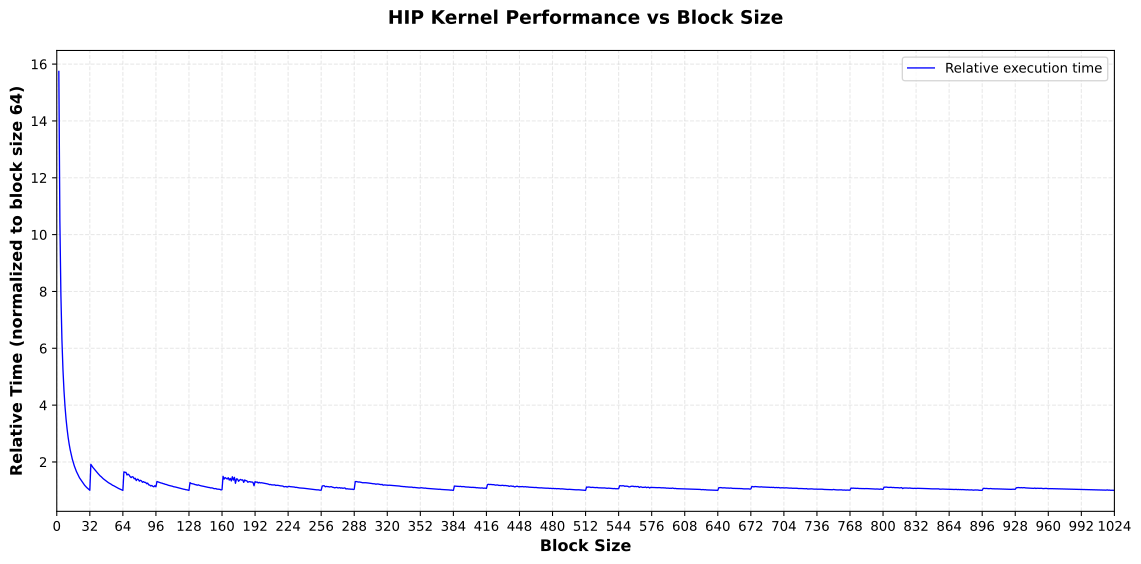
Impact of block size on program performance. The image gamma correction execution time reflects a 16,384 × 16,384 RGB image on a Radeon PRO W7800 GPU.#
Performance benefits and application patterns#
The GPU implementation of image gamma correction demonstrates significant performance advantages over CPU-based approaches. By leveraging thousands of parallel threads, you can process millions of pixels simultaneously, making this technique particularly effective for high-resolution images and real-time video processing applications.
The embarrassingly parallel nature of gamma correction makes it an ideal candidate for GPU acceleration. Similar patterns appear in many other image processing operations, including:
Color space conversions (RGB to grayscale, HSV transformations)
Brightness and contrast adjustments
Image filtering with separable kernels
Histogram equalization
Pixel-wise arithmetic operations
When you encounter algorithms where each output element depends only on a corresponding input element (or a small, fixed neighborhood), consider applying the same parallelization strategy demonstrated here. The key characteristics that make a workload suitable for this approach include:
Independent calculations for each output element
Minimal or no inter-thread communication requirements
Regular memory access patterns
Sufficient computational work per thread to offset kernel launch overhead
By understanding these patterns and optimization techniques, you can effectively accelerate a wide range of image processing and data-parallel workloads on AMD GPUs using HIP.